Extends the WordPress Plugin Leaflet Map with Leaflet Plugins and other functions. Functions Create an elevation chart profile of a track. There are also acceleration, slope, speed and tempo chart profiles. You can also place multiple tracks on one map. By default Leaflet Map uses tiles from openstr
PricingFree downloadThe WordPress.org download is free. Pro versions, add-ons or external services may cost extra.
CompatibilityRequires WordPress 6.8 and PHP 8.2.
SourceWordPress plugins · Nov 28, 2026
01 / Source details
Aboutthistool.
Extends the WordPress Plugin Leaflet Map with Leaflet Plugins and other functions.
Functions
Create an elevation chart profile of a track. There are also acceleration, slope, speed and tempo chart profiles. You can also place multiple tracks on one map.
By default Leaflet Map uses tiles from openstreetmap.org or from the tile servers you configured. You can use more and switch between them.
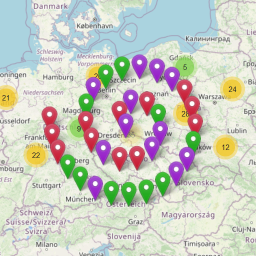
Many markers on a map become confusing. You can cluster and shape them.
You can use Awesome markers.
You can group the elements on the map by criteria and show/hide them.
Create a “featured map”.
Create an overview map with geo-locations provided in the pages and posts.
Get a tooltip when hovering over an element.
You can display the map in fullscreen mode.
Reset the map.
Gesture handling
Manage your files for Leaflet Map.
and more functions.
Included Leaflet Plugins
Leaflet Plugins
leaflet-elevation : A Leaflet plugin that allows to add elevation profiles using native SVG and Canvas elements.
Leaflet.GeometryUtil
Leaflet.i18n : Internationalisation module for Leaflet plugins.
leaflet-rotate : A Leaflet plugin that allows to add rotation functionality to map tiles
Leaflet.AlmostOver : This plugin allows to detect mouse click and overing events on lines, with a tolerance distance.
@tmcw/togeojson : Convert KML, GPX, and TCX to GeoJSON.
Leaflet.ExtraMarkers : Shameless copy of Awesome-Markers with more shapes and colors.
Leaflet List Markers : A Leaflet Control for listing visible markers in the map.
Leaflet.FeatureGroup.SubGroup : Grouping of Leaflet elements by options and features.
Leaflet.Control.Layers.Tree : A Tree Layers Control for Leaflet.
Leaflet Control Search : Search Markers/Features location by option or custom property.
leaflet.zoomhome : Provides a zoom control with a “Home” button to reset the view.
leaflet.fullscreen : Simple plugin for Leaflet that adds fullscreen button to your maps.
Leaflet.GestureHandling : A Leaflet plugin that allows to prevent default map scroll/touch behaviours.
turf : Advanced geospatial analysis for browsers and Node.js
Removed
leaflet-choropleth : Choropleth plugin for Leaflet (color scale based on value) – see Choropleth for Leaflet Map
Included Font
Font Awesome 6
Documentation
Detailed documentation and examples in German and English .
Thank you
Many thanks to everyone who found errors and provided ideas for new functions.
See it in action
Screenshots & previews.
Track with elevation and speed profilesExtraMarkersGrouping and Tree ViewMarkercluster PlacementStrategiesTooltip on HoverManage Leaflet Map files
02 / Source details
Gettingstarted.
01First you need to install and configure the plugin Leaflet Map .
02Then install this plugin.
03Go to Settings – Leaflet Map – Extensions for Leaflet Map and get documentation and settings options.
03 / Source details
Frequently asked questions.
Is there a widget or other support for the editor?
Yes there is! Take a look to CartoBlocks for Leaflet ! This handles shortcodes for Leaflet Map, but then you can use the shortcodes from Extensions! If you have any questions please ask in the forum .
My gpx file is not displayed!
Is the URL correct? Does the webserver return the correct mime type (application/gpx+xml)? Put in your .htaccess : AddType application/gpx+xml gpx RewriteRule .*\.gpx$ - [L,T=application/gpx+xml]
It doesn’t work!
Are you using any caching plugin? Try to exclude at least these js files from caching:
Are you using any plugin to comply with the GDPR/DSGVO? There might be a problem with that.
If you use a caching plugin and a GDPR/DSGVO plugin you need to distinguish whether the user has accepted the cookie or not. Please ask in the forum !
Apropos GDPR/DSGVO
If you need a plugin for this try DSGVO snippet for Leaflet Map and its Extensions . If you use Complianz | GDPR/CCPA Cookie Consent see here .
How can I report security bugs?
You can report security bugs through the Patchstack Vulnerability Disclosure Program. The Patchstack team help validate, triage and handle any security vulnerabilities. Report a security vulnerability.
FinderPress Media Auditor helps site administrators scan for broken images, missing Media Library files, unreachable media URLs, and other media issues across WordPress content. Use it to audit images, video, audio, PDFs, featured images, and attachment files without sending scan data to an external
The Accepted Payment Methods plugin is a straightforward, lightweight solution that enhances your website by displaying visually appealing icons of the payment methods you accept. This plugin is ideal for a variety of websites, including e-commerce platforms, service-oriented websites, and informati