Smart Variation Swatches for WooCommerce – Color & Image Attribute Swatches
Variation swatches for WooCommerce replace plain attribute dropdowns with clear, clickable WooCommerce swatches . Shoppers can pick colors and images at a glance instead of reading long select lists—better UX and fewer abandoned carts. This free WooCommerce swatches plugin focuses on the attributes
Variation swatches for WooCommerce replace plain attribute dropdowns with clear, clickable WooCommerce swatches . Shoppers can pick colors and images at a glance instead of reading long select lists—better UX and fewer abandoned carts.
This free WooCommerce swatches plugin focuses on the attributes stores use most: WooCommerce color attribute swatches and image attribute swatches, plus text button/label options for sizes and materials.
Why use variation swatches for WooCommerce?
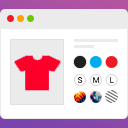
Standard variable products force customers to open a dropdown for every option. With variation swatches for WooCommerce , each option becomes a visual chip:
- Color – Hex-based circles or squares for a true WooCommerce color attribute
- Image – Thumbnails for patterns, fabrics, or styles ( image attribute )
- Button / Label – Short text chips for size, material, or pack type
- Select – Native dropdown when a list is still the best fit
Whether you sell apparel, cosmetics, furniture, or electronics, WooCommerce swatches make variable products easier to understand and faster to buy.
WooCommerce color attribute
Set any global attribute type to Color under Products → Attributes . Then assign a color to each term (e.g. Red, Navy, Olive). On the product page, the WooCommerce color attribute appears as color swatches instead of a dropdown. Global settings apply store-wide so you configure once and reuse everywhere.
Image attribute
For prints, finishes, or product photos, use the image attribute type. Upload a small image per term; customers see visual WooCommerce swatches that match the real product. Ideal for wallpapers, fabrics, phone cases, and similar catalogs.
Free features at a glance
- Variation swatches for WooCommerce – Color, Image, Button/Label, Select
- Global attribute types for WooCommerce color attribute and image attribute
- Modern admin: Dashboard, guided Settings, Help
- Style controls: shape, size, gap, borders, button colors


